

TLDR
Most field sensors, power meters, and PLCs still speak Modbus RTU over a two-wire RS-485 bus. This guide wires an RS-485 sensor loop straight into a Neousys POC-700 or Nuvo-10000 edge computer, sets the COM port to RS-485 mode, and polls registers with a short Python script. No protocol converter box in the middle, and the readings land next to your inference pipeline instead of in a separate historian.
Overview
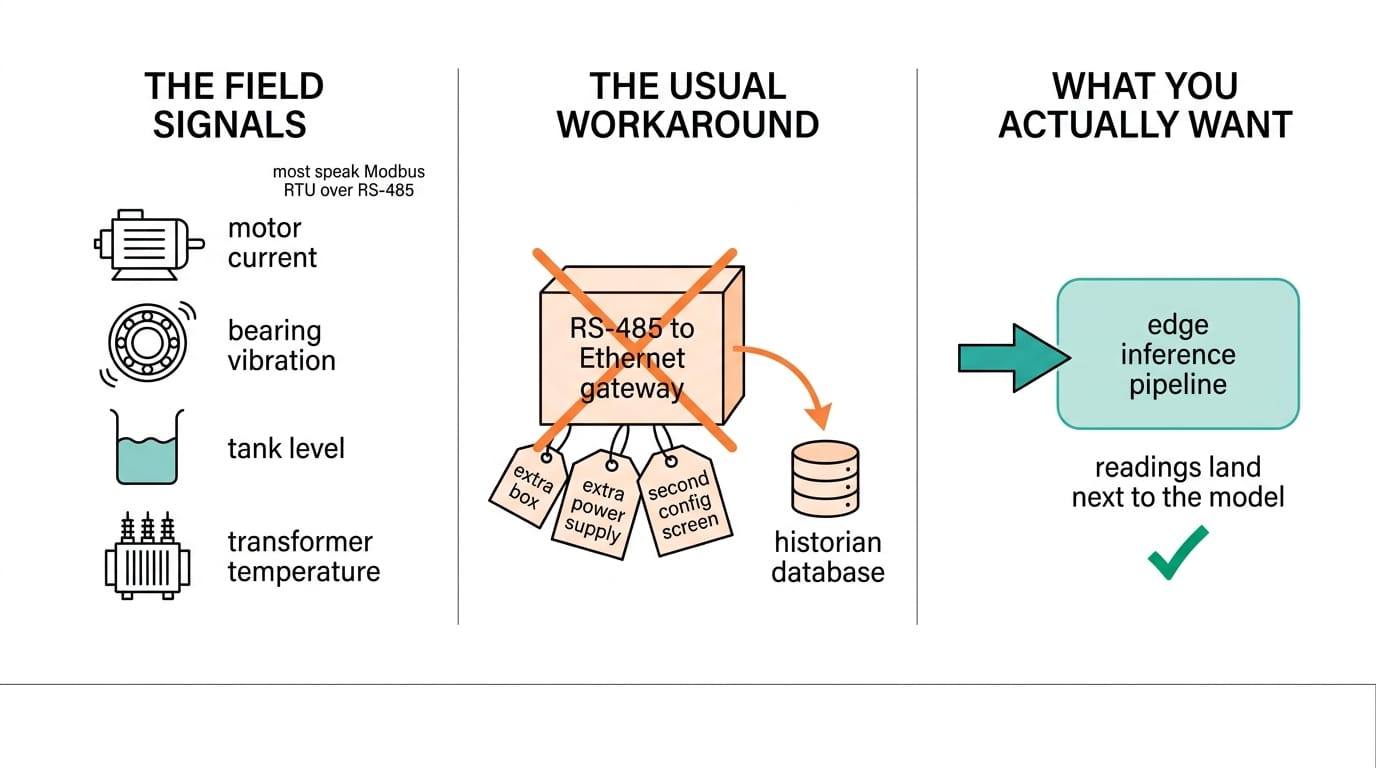
Edge AI projects tend to start with a camera. But the signals that tell you whether a machine is healthy come from humbler sensors: motor current, bearing vibration, tank level, transformer temperature. Most of them talk Modbus RTU over RS-485. That protocol is decades old and it is not going away, because it is cheap, deterministic, and already wired into the plant.
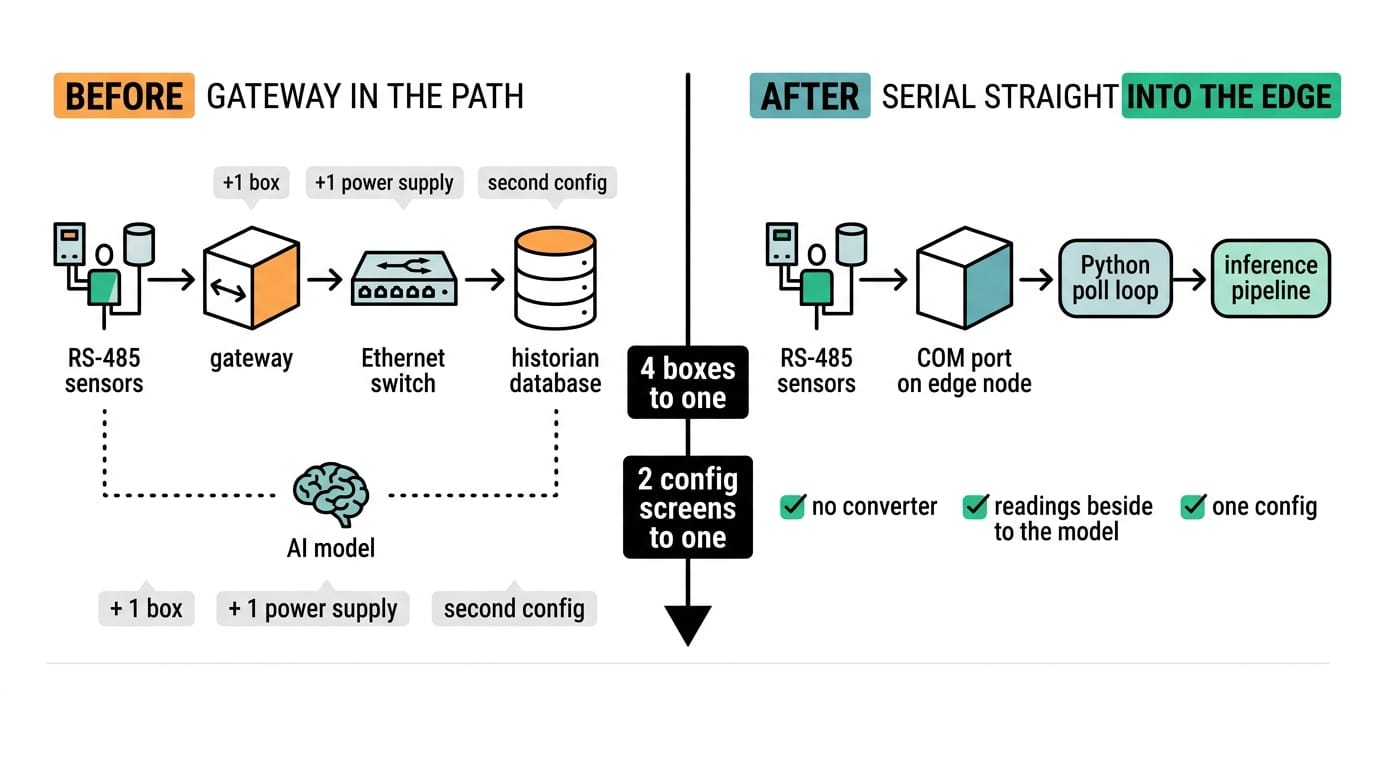
The usual workaround is a standalone RS-485-to-Ethernet gateway. It works, but it adds a box, a power supply, and a second config screen. If your edge computer already has serial ports, you can skip it. Both the POC-700 and the Nuvo-10000 ship with software-selectable RS-232/422/485 COM ports, so the sensor bus terminates on the same machine that runs your model.
This guide covers the wiring, the port setup, and a working poll loop. For the protocol trade-offs behind the choice, see our reference on industrial protocols and connectivity for edge AI and the breakdown in MQTT vs Modbus TCP. If you later need to backhaul the same registers to the cloud, we covered that pattern in eliminating protocol converters with a native Modbus-to-MQTT gateway.
Components Needed
| Item | Role | Example | Notes |
|---|---|---|---|
| Edge computer | Master, runs the model | POC-700 or Nuvo-10000 | Software-selectable RS-232/422/485 COM port |
| RS-485 sensors | Modbus RTU slaves | Power meter, vibration probe, RTD transmitter | Each needs a unique 1-247 address |
| Two-wire cable | The bus | Shielded twisted pair, 120 ohm | D+ / D- plus a signal common |
| Termination | Signal integrity | 120 ohm resistor at each bus end | Not the drops in between |
| Cellular RTU gateway | Optional remote backhaul | IOG700-0T501 | Only if the site has no wired uplink |
Keep sensor addresses, baud rate, and register maps in one sheet before you touch a wire. Half of Modbus RTU debugging is really address and byte-order bookkeeping.
Step-by-Step Setup
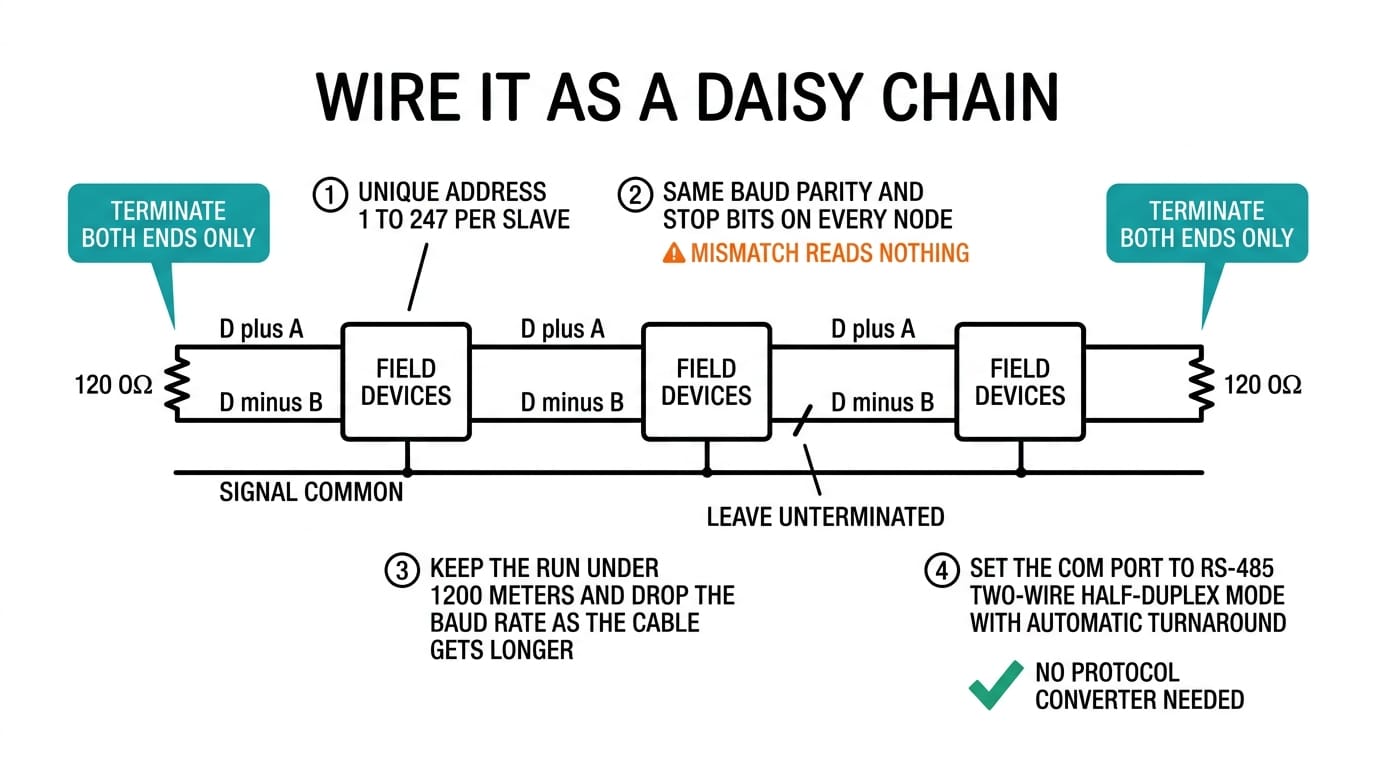
Wire the bus as a daisy chain, not a star. Run D+ to every device's D+ (often labeled A), D- to every D- (B), and carry a signal common alongside so grounds do not drift between nodes. Put one 120 ohm terminating resistor at the computer end and one at the far device. Leave the middle drops unterminated.
Address each slave to a unique value from 1 to 247 and set every device on the bus to the same baud rate, parity, and stop bits. A mismatched 9600 against 19200 is the most common reason a fresh bus reads nothing. Keep the run under about 1,200 meters and drop the baud rate as the cable gets longer.
On the edge computer, set the COM port to RS-485 two-wire mode in the Neousys serial utility or BIOS. Two-wire RS-485 is half-duplex, so the driver keys the line only while transmitting. The Neousys ports handle that turnaround automatically, which spares you the RTS timing games older USB dongles force on you.
Configuration
Install a Modbus library and confirm the port shows up. On Linux the Neousys COM port enumerates as `/dev/ttyS1` or similar; on Windows it is a `COM` number.
from pymodbus.client import ModbusSerialClient

client = ModbusSerialClient(
    port="/dev/ttyS1",
    baudrate=9600,
    parity="N",
    stopbits=1,
    bytesize=8,
    timeout=1)
client.connect()

# read 2 holding registers from slave address 1
r = client.read_holding_registers(address=0, count=2, slave=1)
print(r.registers)
Match `baudrate`, `parity`, `stopbits`, and `bytesize` to what the sensors expect, usually 9600 8N1 or 19200 8N1. Read holding registers with function 03 and input registers with function 04. Watch the byte and word order: many meters return 32-bit floats as two registers, and some swap the high and low word. If a value looks scaled by 65,536 or reads backwards, flip the word order before you blame the sensor.
Testing and Validation
Poll one device first, confirm the register values match the meter's own display, then add the rest of the bus one address at a time. If reads time out, check termination, confirm D+ and D- are not swapped, and verify every node shares the same serial settings. A cheap USB RS-485 sniffer on the bus tells you fast whether the problem is wiring or software.
Once the loop is stable, hand the decoded values to the same process that runs your model so a threshold breach or an anomaly score can act on live field data. That is the whole point of terminating the bus on the compute node instead of a separate gateway.
Related Products


Conclusion
Terminating an RS-485 Modbus RTU bus on the edge computer removes a gateway, a config screen, and a failure point, and it puts field data in the same process as your model. Get the wiring, addressing, and serial settings right and the software half is a short poll loop. Both the POC-700 and the Nuvo-10000 give you the serial ports to do it without extra hardware.
Follow Neteon on LinkedIn for more edge integration walk-throughs, or reach us at [email protected] or www.neteon.net to scope an RS-485 sensor integration for your site.
FAQs
Do I need a separate RS-485-to-Ethernet gateway with a Neousys edge computer?
No. The POC-700 and Nuvo-10000 include software-selectable RS-232/422/485 COM ports, so a Modbus RTU sensor bus can terminate directly on the computer that runs your model. A standalone gateway is only needed when you must backhaul data from a site with no wired uplink.
How many Modbus RTU devices can share one RS-485 bus?
Modbus RTU addresses run from 1 to 247, and a standard RS-485 transceiver drives up to 32 unit loads before you need a repeater. Each device must have a unique address and share the same baud rate, parity, and stop bits.
What causes a fresh RS-485 bus to read nothing?
The most common causes are mismatched serial settings (for example 9600 against 19200), swapped D+ and D- wires, and missing termination. Put a 120 ohm resistor at each end of the bus, not on the middle drops, and confirm every node uses identical baud, parity, and stop bits.
Which Modbus function codes should I use?
Function 03 reads holding registers and function 04 reads input registers. Many meters return 32-bit floats as two registers, and some swap the high and low word, so check word order if a value looks scaled by 65,536 or reads backwards.
How long can an RS-485 run be?
Up to about 1,200 meters with shielded twisted pair. Longer runs need lower baud rates to stay reliable, so drop from 19200 toward 9600 as the cable gets longer.